WORKFLOWS
A client report template that survives questions

A client report has three jobs: say what you changed, say what you measured, and say what is still unknown. The change log does most of the work, because a placement reading without the list of changes made that month cannot be interpreted by anyone. Report activity and observations, never a deliverability rate you caused or a result you can guarantee.



What the report has to do, and what it must never promise
Deliverability work is bought on trust, reported in numbers and judged months later. A report that claims causation is a liability the day a campaign underperforms. A report that only shows a chart going up is worse, because it invites the client to draw the causation themselves.
The report states
- What was changed this period, dated, one line per change
- What was measured, with the instrument, the sample and the unit
- What the client's own logs show about real recipients: bounces, complaints, unsubscribes
- What remains open, and what would be needed to close it
- What was spent, per mailbox and per test credit
The report never states
- A deliverability rate for the client's recipients, which no seed test measures
- That a change caused an improvement, when several changes were made at once
- A guarantee of inbox placement, which no vendor and no agency can give
- A percentage without its denominator
- A forecast for next month presented as a commitment
The distinction to hold in every paragraph: you report what you did and what was observed. The link between the two is a hypothesis, and it is labelled as such.
The change log is the report
Write the change log as the work happens, not at the end of the month. Every line is one change, one date, one owner, one expected effect and one way to reverse it. Without it, a reading three weeks later has no explanation available, and the temptation is to credit the tool that happens to be on the invoice.
The log below is fictional and written for this guide. Dates are relative on purpose.
Change log, one client, one period
Sample log · fictional data| Day | Change | Owner | Expected effect | Reversal |
|---|---|---|---|---|
| 1 | DKIM key published for the sending subdomain | Agency | Authentication passes on the subdomain | Remove the DNS record |
| 1 | DMARC policy left at p=none, reports collected | Agency | Visibility only, no enforcement | None needed |
| 3 | List of 8,400 addresses verified, 611 removed | Agency | Lower hard bounce rate | Removed addresses kept in an archive file |
| 4 | Warmup switched on for 6 of 12 mailboxes | Agency | Under test, hold-out kept | Disconnect and revoke access |
| 9 | Client changed the campaign subject line | Client | Unknown, breaks comparability | Not reversible, noted as a limit |
| 16 | Daily volume raised from 40 to 90 per mailbox | Client | Unknown, breaks comparability | Lower the cap in the sending platform |
A change log that contains client side changes is not a failure of process, it is the process working. The report's job is to make those lines visible, because they are exactly what a later reading will depend on.
The template, section by section
Seven sections, in this order. Keep the order stable across periods and across clients, so a client can compare two reports without relearning the document.
- Scope. Domains, subdomains and mailboxes covered, with the count. Anything outside the scope is named, so nobody assumes it was watched.
- Change log. The table above, agency lines and client lines together.
- Authentication status. SPF, DKIM and DMARC, per sending domain, as observed at the start and at the end of the period. This is a configuration fact, not a prediction, and it is the most useful line in the report.
- Placement observations. One table per run: instrument, seed count per provider group, folder split, missing seeds counted separately. Always with the unit written out: seed addresses, not recipients.
- Client side signals. Hard bounces, complaints where the provider reports them, unsubscribes, taken from the client's sending platform. These are the only figures in the report about real people.
- Open questions. What the period could not settle and why, in plain sentences. A report with an empty open questions section is a report that overclaims.
- Spend. Per mailbox subscriptions, test credits consumed, and the total for the period, matched to invoices.
One page per section at most. A deliverability report that runs to thirty slides gets skimmed, and the open questions section is the first casualty.
The observation table, written so it cannot be misread
Most disputes come from a single ambiguity: the reader assumes a placement figure describes their customers. Kill the ambiguity in the caption, in the column header and in the footnote. The table below is fictional.
Placement observation, one message
Sample table · fictional data| Provider group | Seeds | Inbox | Spam | Missing | Read as |
|---|---|---|---|---|---|
| Provider A | 41 | 36 | 3 | 2 | no finding |
| Provider B | 38 | 19 | 17 | 2 | gap worth investigating |
| Provider C | 17 | 12 | 4 | 1 | sample too small to read closely |
| Other | 13 | 9 | 2 | 2 | direction only |
The last sentence of that footnote is the one that saves the agency. A single headline percentage invites a comparison with last month that the sample cannot support, and it travels through the client's organisation without its caveats.
The access ledger, and the revocation you owe the client
Running warmup and testing across client accounts means holding access to other people's mail. Keep a ledger, one row per grant, and treat offboarding as a deliverable rather than an afterthought.
| Column | What goes in it |
|---|---|
| Mailbox | Address and provider |
| Tool | The vendor holding the access |
| Grant type | Authorisation flow, or sending and reading credentials such as an application specific password |
| Granted by | The named person who approved it, agency side or client side |
| Approval | Where the written approval lives |
| Revocation step | The exact screen and action, tested once before it is needed |
| Removal date | Planned date, and the date it was actually done |
The revocation paths worth knowing on Google accounts, as the provider documents them:
- Application specific passwords require 2-Step Verification on the account, cannot be created for accounts using only security keys or under Advanced Protection, and are withdrawn with Remove in the App Passwords list. Google states that after revocation "the app can't access your Google Account again". Source: Google Account Help, app passwords.
- Authorised third party apps are listed in the Google Account and can be reviewed or removed at any time, with one limit Google spells out: "you may need to contact the developer of the app to request that they delete the data they already have". Source: Google Account Help, third party access.
- Microsoft and other providers expose equivalent screens, but the path depends on the tenant and on admin policy. Open and test the path in the client's own tenant, then write it in the ledger. We have not verified every tenant configuration, and an untested revocation step is not a revocation step.
Revocation stops access. It does not delete what the vendor already stored, including warmup message content and metadata. If the client needs deletion, request the vendor's procedure in writing at onboarding, keep the reply, and quote it in the offboarding section rather than paraphrasing it.
Offboarding checklist, run in this order: disconnect the mailbox inside the tool, revoke the grant at the provider, confirm the grant is gone by reloading the provider's list, export the data, cancel the per mailbox subscription, then write the removal date in the ledger and in the final report.
Exports, and what the client actually owns
Everything in the report must be reproducible from files the client keeps after the engagement ends. Export at every period close, not only at the end.
- Raw placement rows, per provider group and per mailbox, with seed counts. Summary charts are not an export.
- Authentication records as observed, so a later dispute about what was configured has evidence.
- Warmup activity, volumes per day and per mailbox, the only trace of what was actually done to the mailboxes.
- Bounce, complaint and unsubscribe logs from the client's sending platform. These belong to the client already, and should never live only in the agency's account.
- The change log itself, as a file, not as a paragraph inside a slide.
- Invoices, per mailbox and per credit pack, matched to the spend section.
Two practical points. Accounts and credits are usually tied to the party that opened them, so decide at onboarding whether tools are bought in the client's name or the agency's, and write the answer in the ledger: it decides who keeps the history at the end. And check the export format in the first week of any tool, because a product that only draws dashboards will leave you rebuilding a year of history by hand. Which export formats each product offers is not something we have tested, so verify it in your own account rather than trusting a feature list.
Costing the period without surprises
The spend section fails in one predictable way: a per mailbox price is quoted for one mailbox, then the invoice arrives for the whole fleet. Warmup is sold per mailbox at MailReach and at Warmup Inbox, placement testing is sold in credits at GlockApps, list verification is sold per address at ZeroBounce, and Instantly folds warmup into its sending plans instead of billing it separately. Four different units, so a single number for the period means nothing without them.

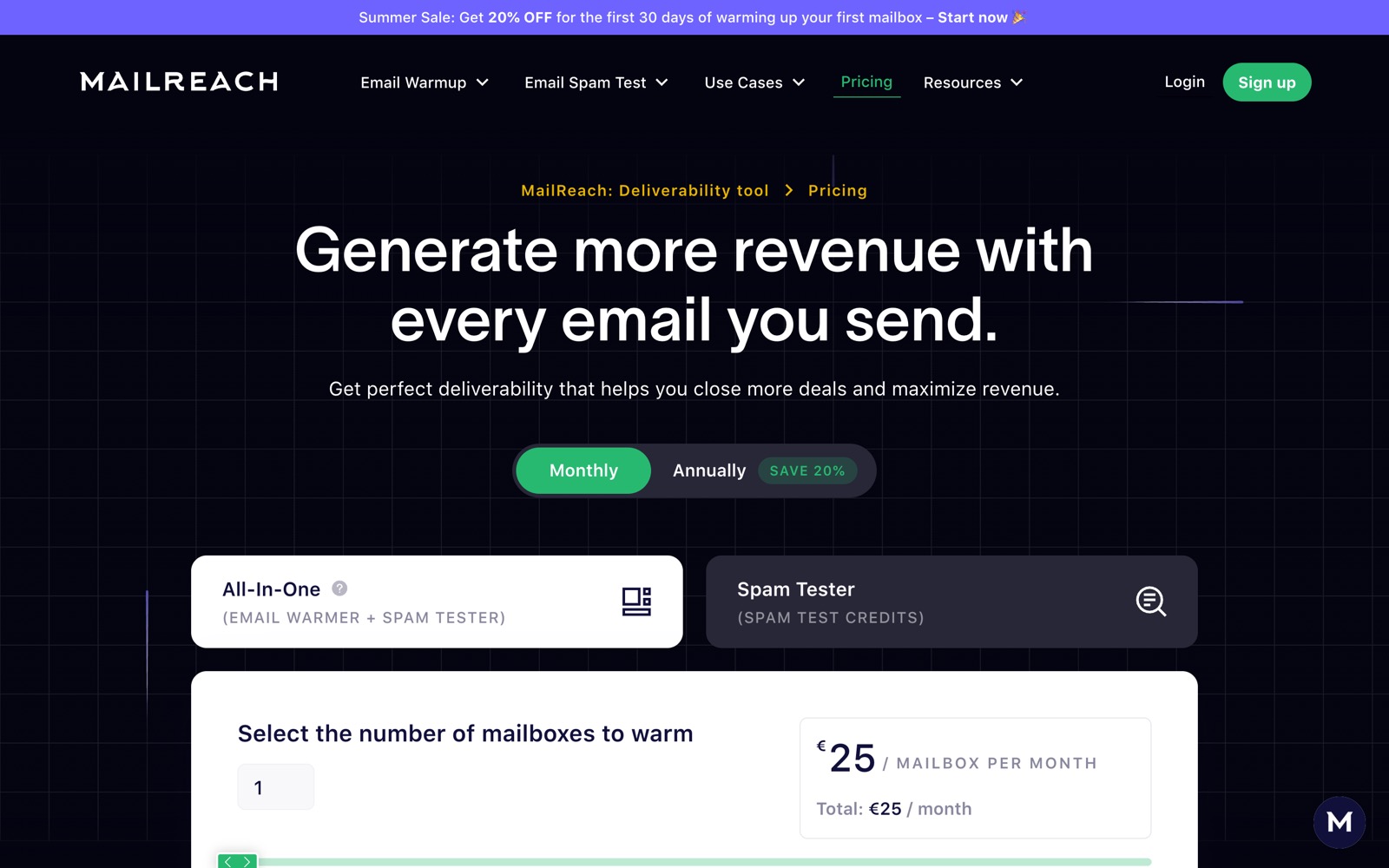
Entry level per mailbox pricing sits at $19.50 per month for the MailReach all-in-one plan and $15 per month for the Warmup Inbox entry plan, before any multiplication by mailbox count, by month and by client. Price the fleet in the cost calculator, put the result in the spend section, and keep test credits on their own line: they are consumed per run, so a month with a re-test costs more than a quiet one.
The sentences that get agencies into trouble
Write this
- "We published DKIM on day 1 and verified the list on day 3. Seed placement at provider B was 19 inbox out of 38 seeds at the end of the period."
- "Hard bounces fell from 4.1% to 1.3% on your own sends after the list verification. This figure covers real recipients."
- "Two changes were made on your side during the period, so this reading cannot be attributed to any single action."
- "Open question: provider B stays below the others. Next step is a repeat test on the same seed list before any change."
Not this
- "Deliverability improved by 23% this month."
- "You are now landing in the primary inbox."
- "Warmup fixed your reputation."
- "We guarantee inbox placement on the next campaign."
Every sentence in the right column is either a causal claim without a control, a rate for recipients drawn from seed addresses, or a promise about a filter you do not operate. The left column says less and holds up a year later, which is the only test that matters for a document a client keeps.
Questions people also ask
What belongs in a client report and what does not?
In: the dated change log, authentication status per domain, placement observations with their sample and unit, the client's own bounce and complaint figures, the open questions, and the spend. Out: any deliverability rate attributed to your work, any guarantee, any headline percentage without its denominator, and any forecast presented as a commitment.
Why is the change log more important than the numbers?
Because a reading is only interpretable against what changed. A month with six changes, two of them made by the client, cannot attribute anything to a single action, and the log is what makes that visible. Written after the fact, the log becomes a reconstruction, which is why it is filled in as the work happens.
How do we handle access to client mailboxes?
One ledger row per grant: mailbox, tool, grant type, who approved it, where the written approval lives, the exact revocation step, and the removal date planned and done. Test the revocation path once before you need it. On Google accounts, app passwords are removed from the App Passwords list and authorised apps from the linked apps list, and removing access stops future access without deleting data the vendor already holds.
Should the tools be bought in the client's name or ours?
Decide at onboarding and write it in the ledger, because it decides who keeps the history and the credits when the engagement ends. Accounts opened in the agency's name are simpler to operate and leave the client with nothing at the end unless you export everything. Either choice is defensible, an undocumented one is not.
Can we report an inbox rate for the client's recipients?
No. Seed based placement testing measures seed addresses, which never open, never reply and never complain, and whose provider mix is not the client's provider mix. Report the seed split with its counts and its unit, and keep the bounce, complaint and unsubscribe figures from the client's sending platform as the section about real people.